What problem does the module solve?
Instead of forcing every item on a sales order to use one warehouse, the module lets the fulfillment source be selected per line while keeping the process inside Odoo’s standard Sales and Inventory workflow.
Warehouse per line
Product A can ship from the main warehouse while Product B ships from another branch in the same sales order, when per-line selection is enabled on that order.
Automatic split deliveries
On confirmation, procurement follows the warehouse selected on each line, so warehouse-specific moves and deliveries are created without separate sales orders.
Warehouse-aware availability
The quantity widget and Forecast action use the effective line warehouse in multi-warehouse mode instead of relying only on the sales order warehouse.
1 · Global activation
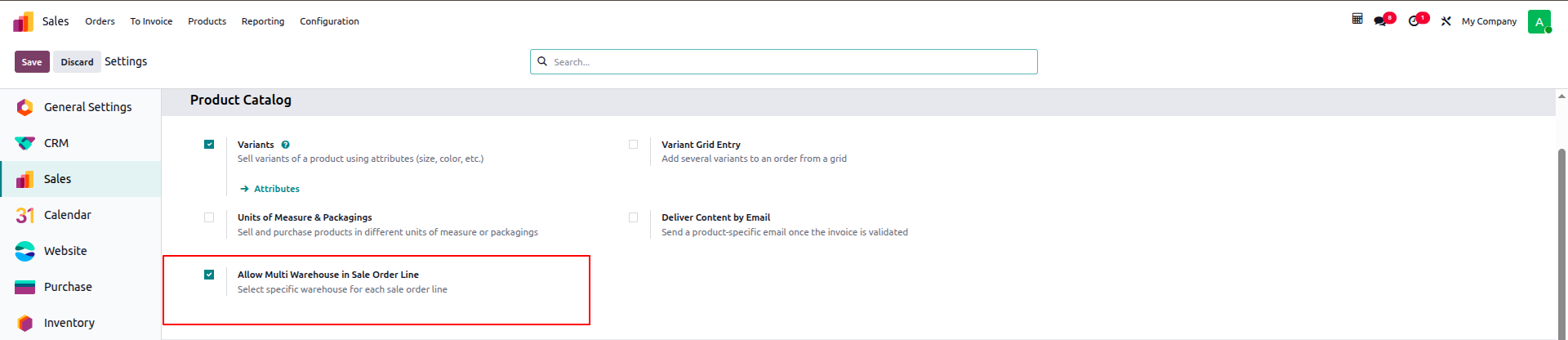
Start from Sales Settings
The module adds Allow Multi Warehouse in Sale Order Line to Sales settings. When the feature is disabled, procurement and availability fall back to the sales order warehouse, so old line warehouse values do not keep affecting fulfillment.
2 · Order-level opt-in
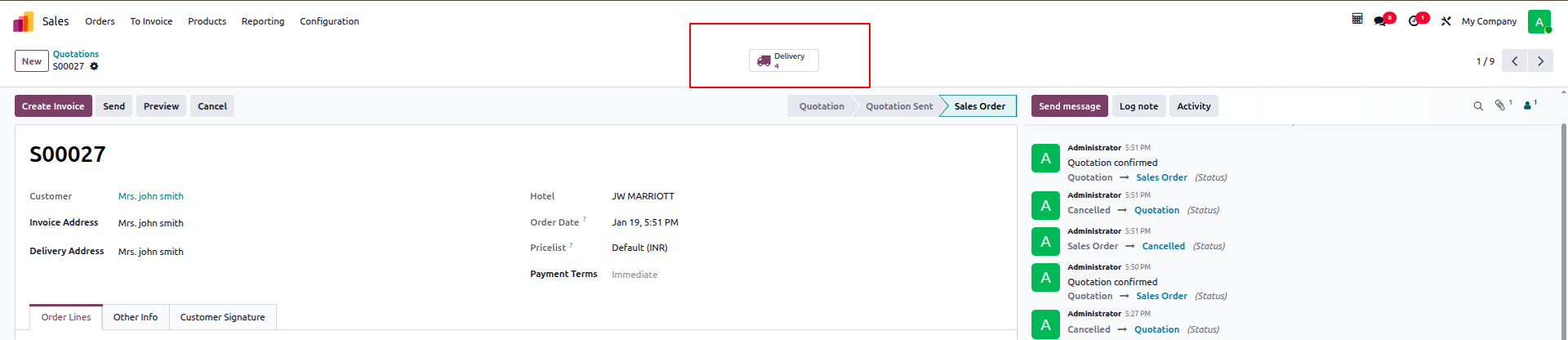
Each sales order makes its own choice
Once the global feature is enabled, Choose Warehouse per Line appears next to the sales order Warehouse. The choice is stored on the order, so only orders that need multi-warehouse fulfillment use it while other orders keep standard behavior.
3 · Line-level control
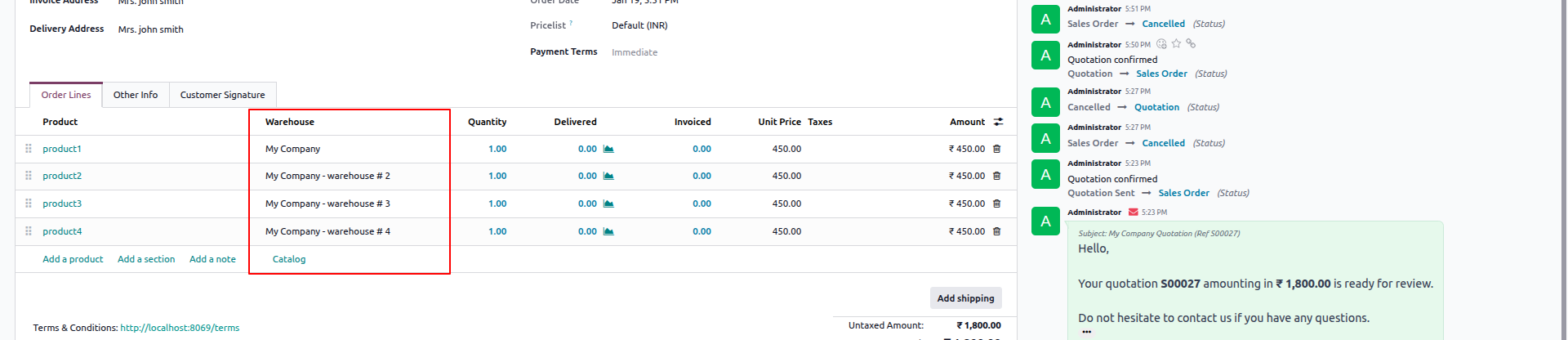
Warehouse becomes part of each product’s fulfillment decision
When per-line mode is enabled, Warehouse appears on the order line list. The module stores the line warehouse and computes an Availability Warehouse used for quantity and forecast logic. A line that has not been processed remains editable subject to safety rules.
4 · Fulfillment result
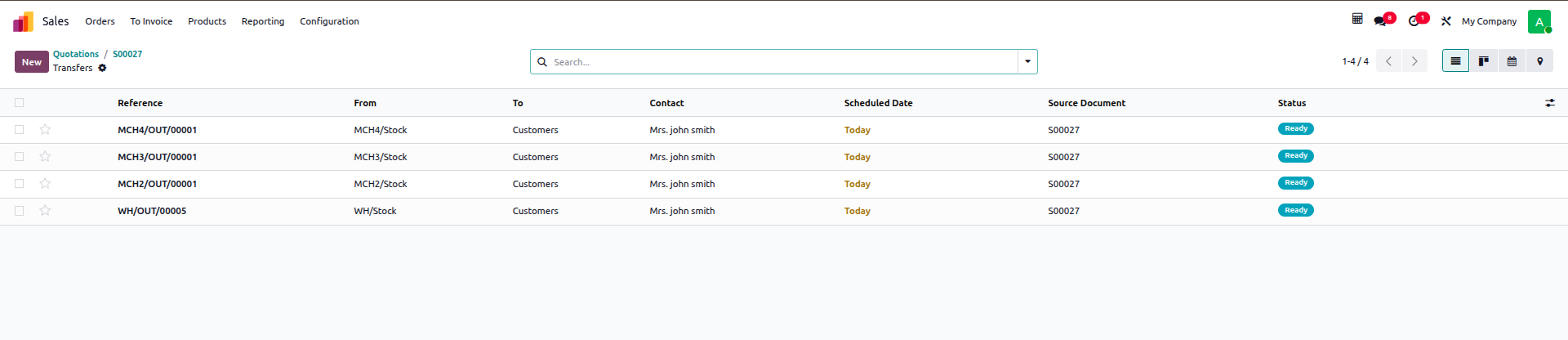
Each warehouse gets the delivery it needs
When lines use different warehouses, stock rules are launched using each line’s warehouse. Lines for the same warehouse can share a delivery, while different warehouses generate separate deliveries connected to the original sales order.
End-to-end workflow
01
Enable the feature
Turn on warehouse-per-line support from Sales Settings.
02
Create the quotation
Select the customer and products using the normal Odoo sales flow.
03
Opt in on the order
Enable Choose Warehouse per Line when this order needs fulfillment from multiple warehouses.
04
Select line warehouses
Choose the suitable warehouse for each product; otherwise the sales order warehouse remains the effective source.
05
Confirm the sales order
Standard stock rules launch using the effective line warehouse and create the required transfers/deliveries.
06
Track and reroute pending lines
An eligible pending line can change warehouse; the old open move is cancelled and procurement is relaunched from the new warehouse without duplicating quantity.
Guards that prevent unsafe warehouse changes
Warehouse flexibility is intentionally bounded. The code checks the line and its related stock moves before accepting a warehouse change.
Processed lines are locked
As soon as any stock move for the line reaches Done, Warehouse Locked becomes true and the warehouse field becomes readonly for that line only.
Locked orders are not rerouted
If the sales order is locked, the module rejects a warehouse change until the order is unlocked, preventing a move from being cancelled without safe recreation.
Purchase / Manufacturing protection
If an open move is supplied by a purchase order or manufacturing order, automatic rerouting is blocked and the upstream document must be handled first.
No quantity duplication
For an allowed reroute, open moves are cancelled and stock rules are launched again only for the outstanding quantity.
Availability and Forecast understand the line warehouse
The module does more than change the delivery source. On quotations and orders it computes qty_available_today, free_qty_today and virtual_available_at_date using Availability Warehouse. It also patches Odoo’s standard Forecast popover so warehouse_id points to the effective line warehouse.
- Before per-line mode: availability uses the sales order warehouse.
- With per-line mode: each line reads availability and forecast from its selected warehouse.
- On confirmed orders: tracking follows the line’s open stock moves and their expected dates.
What does the module change technically?
sale.order
Adds Choose Warehouse per Line plus a computed flag for the global feature.
sale.order.line
Adds editable Warehouse, computed Availability Warehouse, and Warehouse Locked based on stock moves.
Procurement
Passes the correct warehouse_id and prevents a line from another warehouse being forced into an unsuitable procurement group.
Forecast UI
A small patch to QtyAtDatePopover opens product forecast using the effective line warehouse.
Views
Safe inheritance of the Sales Order and Sales Settings views; Odoo core files are not modified.
Security
No new groups or record rules are introduced; the module operates within existing Odoo Sales and Inventory permissions.
Where is this useful?
- A distributor with a central warehouse and branches that needs one customer order fulfilled from several locations.
- A spare-parts business where a product is available in a branch different from the sales order’s default warehouse.
- A logistics workflow that needs delivery orders split by stock source while keeping the customer order and invoicing flow unified.
- A sales team that needs realistic warehouse-specific Forecast visibility before committing the fulfillment source.
Important scope boundaries
The module selects the fulfillment warehouse per sales line and safely reroutes eligible pending moves. It does not replace Routes, Reordering, Purchase, or MRP logic, and it does not bypass Odoo’s locked-order safeguards. If a purchase or manufacturing document feeds the line, that upstream document must be handled before the source can be changed.
Frequently asked questions
Need the same logic adapted to your operation?
We review warehouse allocation, supply routes and user permissions first, then configure the solution while preserving Odoo’s standard workflow.
Discuss this solution