45 apps — Odoo 16
 Access Management StudioCentral rules per user group to hide menus, fields, buttons, actions and filters, or make users read-only.
 Advanced Web Domain WidgetSets relational field domains by picking records with in / not in operators.
 Allow or Block Negative-Stock SalesAdds a per-product flag that decides whether a sale order can be confirmed when stock is short.
 Automatic PayrollGenerates payslip batches automatically on a chosen date each month.
 Base Order TypesProvides the base order type record (name, image, home delivery flag) used by the POS order type module.
 Common Functions CoreCore helper module shared by other apps and auto-installed.
 Disallow Negative StockBlocks stock operations that would make a storable product negative in an internal location.
 Employee Contract TypesAdds a contract type to employee contracts.
 Hide Action ButtonsHides Create, Edit, Import, Export, Print, Delete and Duplicate buttons per user group.
 Hide Product PriceHides cost and sales prices from users who are not in the show-price groups.
 Hospital ManagementManages patients, doctors, labs, inpatients and hospital infrastructure with dashboards.
 Import Picking From Excel or CSVImports stock pickings with or without lot and serial numbers from a file.
 Import Picking with Lot/Serial from Excel or CSVImports receipts, deliveries and transfers, with or without lot and serial numbers, from an XLS or CSV file.
 Import Picking with Lot/Serial from Excel or CSVImports receipts, deliveries and transfers, with or without lot and serial numbers, from an XLS or CSV file.
 IP LimitationKeeps a list of allowed IP addresses and links it to each user.
 Mass Clear DataDeletes transactional data in bulk through a wizard, restricted to a dedicated group.
 Multi Branch OperationsAdds branches under a company and stamps them on sales, purchases, stock and accounting records.
 Odoo Customize and BoostAll-in-one tweaks for UI, security, data reset and debugging.
 PayrollManages payroll: structures, salary rules, payslips and batches.Picking Barcode Scanner and Serial UploadScans products on a picking and uploads serial numbers from Excel to print a barcode receipt.
 POS Analytic AccountSets an analytic account on POS shops and posts it on the sales and stock journal entries.
 POS Auto Invoice and No Auto PrintTicks the invoice option automatically on POS orders and can stop the invoice from printing itself.POS Closing Report CustomizationCustomises the POS sales details report used at closing with session and cash balance details.
 POS DashboardAdds a dashboard under the POS reporting menu with key figures and top lists.
 POS Direct LoginSends a cashier straight into the point of sale session right after logging in.
 POS Hide Product InfoHides the product info button on the POS product screen for shops that do not want it.
 POS Hide Refund ButtonHides the refund button in the POS, with an exception option for managers.
 POS Home Delivery OrdersCreates home delivery orders from the POS, tracks their status and takes payment after delivery.
 POS Inventory AdjustmentLets staff count products on the POS screen and create inventory adjustments from it.
 POS Order TypesAdds order types such as delivery, take away and parcel to the POS.
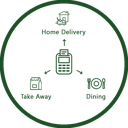 POS Order TypesLets cashiers pick an order type on the POS screen, prints it on the receipt and records it on the order.
 POS Product Quick InfoShows product information with one click on the POS product tile.
 POS Receipt DesignSelects a customised receipt layout for each POS.
 POS Refund PasswordAsks for a numeric password before a POS refund can be processed.
 POS Restrict Zero QuantityBlocks POS sales of products with zero or negative stock.
 POS Return ReasonRecords a reason when returning a POS order, optionally compulsory and printed on the receipt.
 POS Sales Report by CategoryGroups the POS sales details report by product category with reference, product and quantity.
 POS Session Z Report (Thermal)Prints a session summary (Z report) from the POS screen on a thermal printer.
 POS Stock InformationShows on-hand and forecasted stock quantities on the POS product tiles.
 POS User RestrictionLimits each POS user to the shops and orders they are allowed to see.Previous Sale Price on Order LinesShows the last sale price, date and order reference of each product for the same customer.
 Project DashboardA dashboard of project, task, employee, hours, profitability and sale-order figures with date filters.
 Sales and Purchase History SuiteShows customer order history, vendor order history and product sale and purchase price history with reorder.
 Salesperson CommissionCalculates a salesperson's commission on sales and adds it to the basic salary.
 Vendor Purchase DiscountAdds a default discount per vendor and per vendor price line and applies it on purchase order lines.