19 apps — Odoo 16 — Point of Sale
 Base Order TypesProvides the base order type record (name, image, home delivery flag) used by the POS order type module.
 POS Auto Invoice and No Auto PrintTicks the invoice option automatically on POS orders and can stop the invoice from printing itself.
 POS Closing Report CustomizationCustomises the POS sales details report used at closing with session and cash balance details.
 POS DashboardAdds a dashboard under the POS reporting menu with key figures and top lists.
 POS Direct LoginSends a cashier straight into the point of sale session right after logging in.
 POS Hide Product InfoHides the product info button on the POS product screen for shops that do not want it.
 POS Hide Refund ButtonHides the refund button in the POS, with an exception option for managers.
 POS Home Delivery OrdersCreates home delivery orders from the POS, tracks their status and takes payment after delivery.
 POS Order TypesAdds order types such as delivery, take away and parcel to the POS.
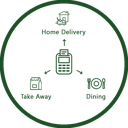 POS Order TypesLets cashiers pick an order type on the POS screen, prints it on the receipt and records it on the order.
 POS Product Quick InfoShows product information with one click on the POS product tile.
 POS Receipt DesignSelects a customised receipt layout for each POS.
 POS Refund PasswordAsks for a numeric password before a POS refund can be processed.
 POS Restrict Zero QuantityBlocks POS sales of products with zero or negative stock.
 POS Return ReasonRecords a reason when returning a POS order, optionally compulsory and printed on the receipt.
 POS Sales Report by CategoryGroups the POS sales details report by product category with reference, product and quantity.
 POS Session Z Report (Thermal)Prints a session summary (Z report) from the POS screen on a thermal printer.
 POS Stock InformationShows on-hand and forecasted stock quantities on the POS product tiles.
 POS User RestrictionLimits each POS user to the shops and orders they are allowed to see.